 Basis
BasisBusiness Identity
Route: /settings/business · Menu: Settings → Business Settings
Set the core details that appear on all printed documents — invoices, statements, and delivery notes.
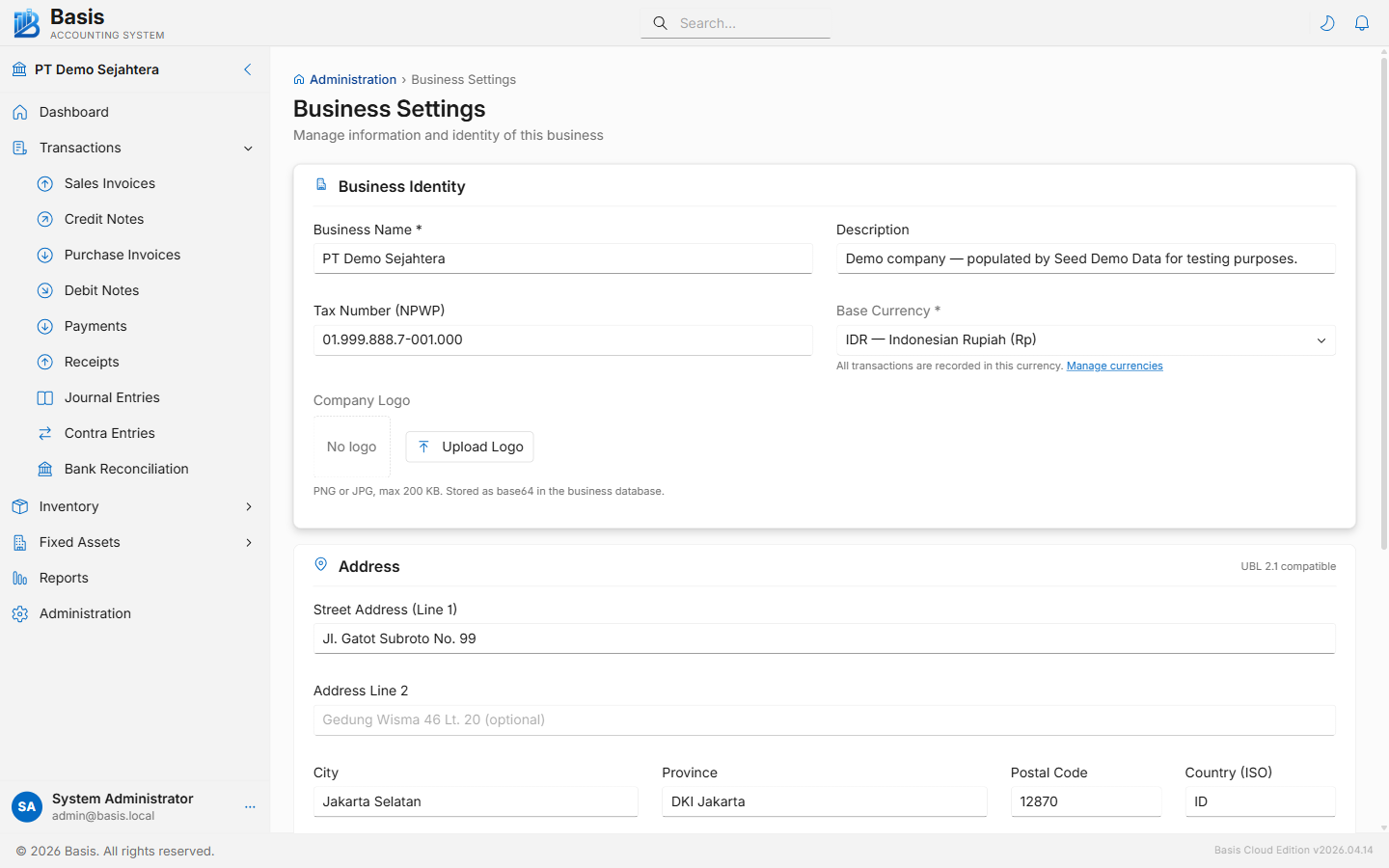
Identity fields
| Field | Status | Notes |
|---|---|---|
| Business Name | Required | Company or sole-trader name printed on all documents. |
| Description | Optional | Short note shown on the business-select screen. |
| Tax Number (NPWP) | Optional | VAT registration number printed on invoices. |
| Base Currency | Required | Home currency for all transactions. Loaded from the Currencies master data list. |
| Company Logo | Optional | PNG or JPG, max 200 KB. Stored as base64 inside the business database file. Appears on printed invoices and delivery notes. |
Address fields (UBL 2.1 compatible)
| Field | Notes |
|---|---|
| Street Address (Line 1) | Main street address. |
| Address Line 2 | Building name, floor, unit — optional. |
| City | e.g., Jakarta Selatan. |
| Province | e.g., DKI Jakarta. |
| Postal Code | 5-digit postal code. |
| Country (ISO) | 2-letter ISO country code, e.g., ID. |
Contact fields
| Field | Notes |
|---|---|
| Phone | Business phone number printed on documents. |
| Business contact email. | |
| Website | Full URL, e.g., https://company.com. |
Export Database
The Download Business Data button exports the full SQLite database file for this business. Use it for offline backup, migration between servers, or creating a copy in the Owner → Backup & Restore panel.
Feature Settings
Route: /settings/features · Menu: Settings → Feature Settings
Enable or disable optional modules to keep the interface focused for your team. Settings are saved per-browser and per-business. Disabling a feature hides its navigation items and form fields — it does not delete any data.
Email Services and Customer Portal require the Server or Cloud edition. They are not available in the Desktop edition.
| Feature | Group | What it enables |
|---|---|---|
| Sales Orders | Sales & Purchase | SO → Delivery Note (GDN) → Sales Invoice workflow. Adds Sales Orders and Delivery Notes to navigation. |
| Purchase Orders | Sales & Purchase | PO → Receipt Note (GRN) → Purchase Invoice workflow. Adds Purchase Orders and Receipt Notes to navigation. |
| Multi Location | Inventory | Track stock per warehouse location. Adds Location field to inventory lines, Inventory Transfers, and Locations master data. |
| Salesman | Sales Team | Assign salesmen to Sales Invoices and Credit Notes. Adds Salesman field to SI/CN forms, Salesmen master data, Salesman Report, and Commission Report. |
| Multi Currency | Finance | Transact in foreign currencies. Adds Currency and Exchange Rate fields to transaction forms, Currencies and Exchange Rates to master data. |
| Projects | Finance | Allocate transactions to projects for P&L tracking. Adds Project field to all voucher forms and shows Projects master data. |
| Email Services | Communication | Send invoices and statements by email. Adds Send Email buttons to document pages, Email Settings and Email Templates to navigation. Server/Cloud only. |
| Customer Portal | Communication | Give customers self-service access to their invoices and statements. Adds Customer Portal settings to navigation. Server/Cloud only. |
Related
- Staff Permissions — manage per-user module access
- Voucher Numbers — configure number series per document type
- Email Settings — SMTP configuration for outbound email
- Opening Balances — enter initial GL, AR/AP, and inventory balances