 Basis
Basis
Staff Permissions is available on Server and Cloud editions only. The Desktop edition always runs as System Admin (single user) and does not enforce per-module access.
User Roles
Each user in a business has one of three roles. Roles are set when adding a user in Owner → Users.
| Role | Access |
|---|---|
| Owner | Full access to all modules and settings. Cannot be restricted. There is exactly one Owner per business. |
| Admin | Full access to all modules and settings. Can manage staff permissions. Cannot change the Owner role. |
| Staff | Access controlled per-module by the permission matrix set by Admin/Owner. |
Permission Modules
Staff access is configured per module. Each module has four levels:
| Level | What the staff member can do |
|---|---|
| None | Module is hidden entirely. Navigation links and pages are inaccessible. |
| View | Can view list pages and detail pages. Cannot create, edit, or delete. |
| Create | Can view, create, and edit. Cannot delete. |
| Full (Delete) | Can view, create, edit, and delete. |
The modules that can be individually controlled for Staff users:
| Module | Covers |
|---|---|
| SalesInvoice | Sales Invoices, Credit Notes, Sales Orders, Delivery Notes, Receipts |
| PurchaseInvoice | Purchase Invoices, Debit Notes, Purchase Orders, Receipt Notes, Payments |
| Payment | Payments, Receipts, Contra Entries, Bank Reconciliation |
| Inventory | Inventory Adjustments, Transfers, Manufacturing, Stock Opname |
| JournalEntry | Journal Entries |
| OpeningBalance | Opening Balances |
| Report | All reports (Financial Statements, GL, Sales, Purchase, Inventory, etc.) |
| MasterData | Parties, Items, Chart of Accounts, Units, Tax Categories, and all other master data |
Editing a Staff Member's Permissions
- Go to Settings → Staff Permissions. Each staff member is shown with their current permission badges.
- Click Edit Permissions on the staff member's card. A dialog opens with a module-level grid.
- Optionally select a Permission Template from the dropdown and click Apply to pre-fill all modules at once.
- Adjust individual modules as needed using the level selector (None / View / Create / Full).
- Click Save. The new permissions take effect on the staff member's next page navigation.
Permission Templates
Route: /admin/permission-templates · Menu: Settings → Permission Templates
Templates are named permission sets you can apply to multiple staff members in one click. Built-in templates (marked ★) cannot be edited or deleted. You can create unlimited custom templates.
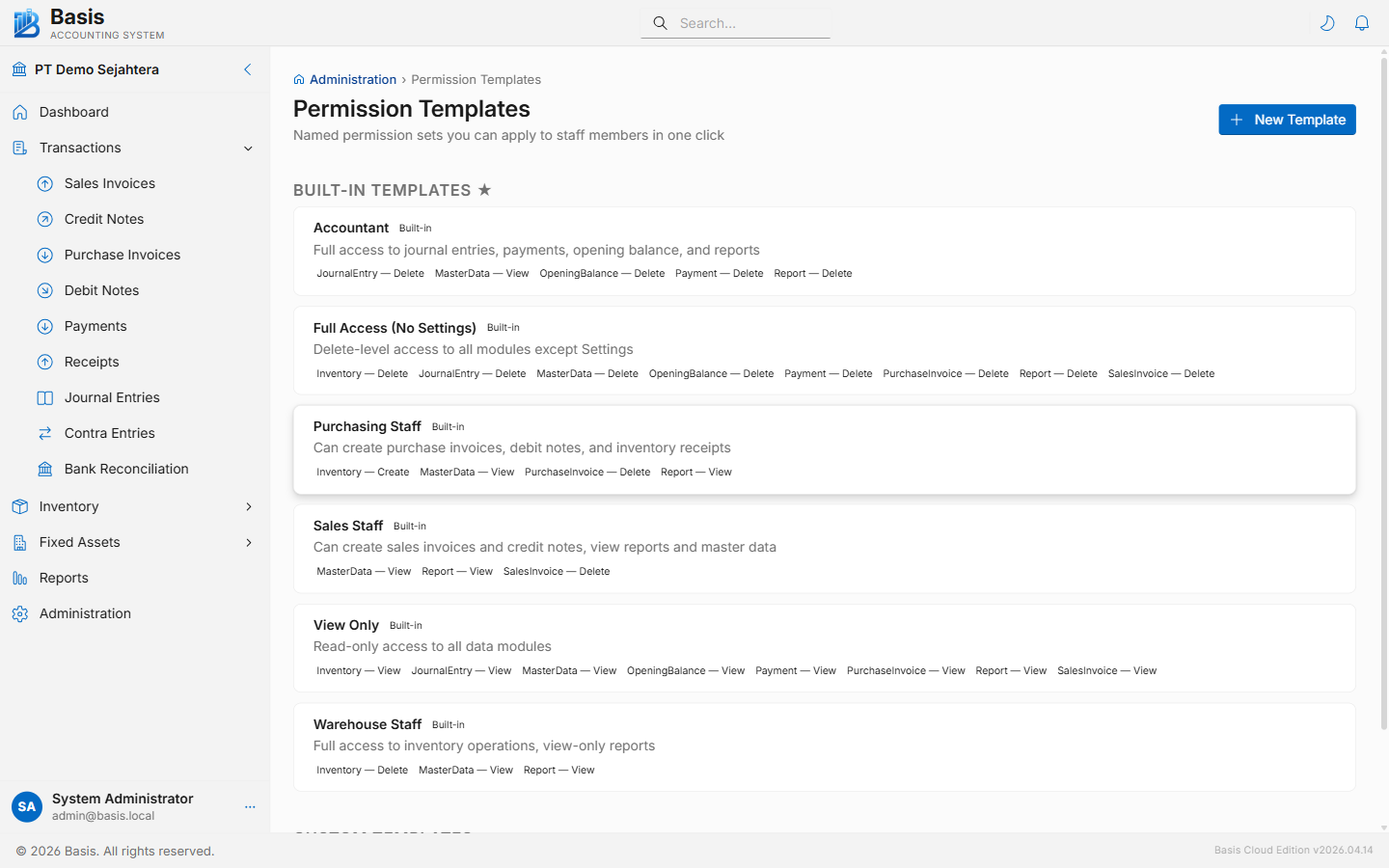
Create a "Cashier" template (Payment only), a "Sales Staff" template (SalesInvoice + Report View), or any other role. Apply templates to new staff in seconds without repeating the same configuration.
Related
- Business Settings — edition info, feature toggles
- Audit Trail — track who deleted which vouchers