 Basis
Basis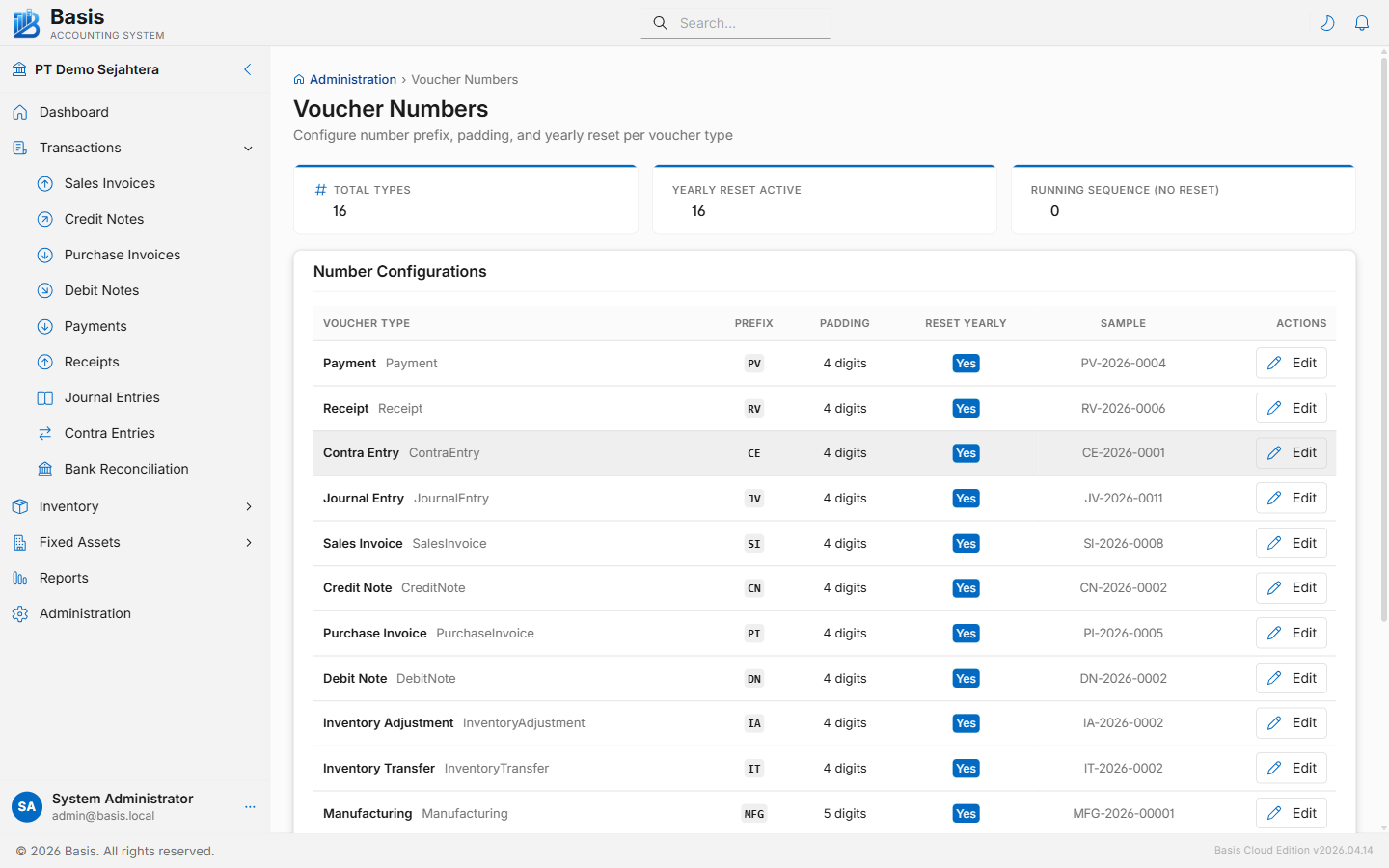
How Numbering Works
Every voucher type (Sales Invoice, Payment, Journal Entry, etc.) has its own independent number series. When a new document is created, the system generates the next number automatically using:
{Prefix}{YYYY/}{sequence padded to PaddingLength digits}Examples: SI-2026-0001, PAY-0042, JNL/2026/0001.
Configuration Fields
| Field | Notes |
|---|---|
| Voucher Type | One row per transaction type: SalesInvoice, CreditNote, PurchaseInvoice, DebitNote, Payment, Receipt, JournalEntry, ContraEntry, SalesOrder, PurchaseOrder, and all inventory types. |
| Prefix | Short text prepended to every number, e.g., "SI-", "PAY/", "INV". Keep it short and recognizable. |
| Padding | Number of digits in the sequence. Padding = 4 produces 0001, 0042, 0100. The sequence grows beyond padding if needed (e.g., 10000). |
| Reset Yearly | If enabled, the sequence resets to 1 on January 1 each year, and the 4-digit year is inserted between the prefix and sequence number (e.g., SI-2026-0001). If disabled, the sequence runs continuously. |
| Sample | A preview column shows what the next number will look like with current settings. |
Changing a Configuration
- Go to Settings → Voucher Numbers.
- Click the edit (pencil) icon on the row for the voucher type you want to change.
- Update the Prefix, Padding, and Reset Yearly fields.
- Check the Sample column to confirm the new format looks correct.
- Click Save.
Changing the prefix or reset setting does not renumber existing vouchers. Previous documents keep their original numbers. Only new documents use the updated configuration.
Related
- Sales Invoices — document number is auto-generated on creation
- Business Settings — company identity and feature toggles